Dissecting my presentation
Last Wednesday I made my web traffic presentation, which received positive feedback and made some excellent impressions. In retrospect, the agreed upon speaking fee should have been a lot higher. I ended up putting quite a lot of time into the content of the talk, possibly resulting in an hourly rate of less than minimum wage. Not to worry, as I learned a number of things about delivering effective presentations, some of which I mentioned in my last post. One might say that I even came out on top.
One of the more important things I learned from my talk is that presentations should not have the same format as essays. I prepared my talk much like I used to prepare my university essays. This wouldn’t have been so bad except that in my introduction I outlined my forthcoming main arguments. With written essays, this is fine because the reader can immediately see how long the essay is and that these points will be discussed later. Not so with a presentation, where the viewer expects whatever is on the slide to be discussed then and there. After a few incantations of “I’ll get to that later” my mistake was fixed but it still generated some confusion and interrupted the flow of my talk.
In addition to touching on content management, HTML, search engines and marketing, my presentation also brought in aspects of usability and web design. I had previously planned to leave out those last two topics due to time constraints and “obviousness” but I’m glad that I chose to include them. Not only did my presentation last precisely one hour as intended, but I was able to pick out several key areas of the newspaper’s website which were lacking in usability or comprehensibility. Amazingly, there were a lot of pages where it wasn’t obvious what was being presented.
People were impressed, not only because of the content of my presentation but also because of how it looked. Keynote can take a lot of the credit for that as I only gave a passing thought to layout, which is how it should be. I even got compliments before I began, purely based on my title page. How many Powerpoint presenters can say that? Keynote made any layout changes outside of its standard templates quick, easy and intuitive. The only problem I had with Keynote is that it forces the presenter to click through old bullet points on a slide after launching a web page from that slide. Was that ever annoying, and something that I will have to work around for my next talk.
Will there be another talk? Who knows. I’ve been realising these past few years that I have accumulated bits and pieces of important knowledge from various domains that have become second-nature to me and yet which others seem to have failed to grasp. It’s not enough expertise to fill books, but digested in hour-long or half-hour long talks it’s bound to have some effect on someone. They just have to pay.
Posted on July 18th, 2006 in computers - No Comments »
Presenting is hard work
I’m scheduled to deliver a presentation to a national newspaper next week on how to increase their web traffic. Apparently I am something of an expert on the subject. Who knew? My presentation will focus on traffic from search engines but will also contain some pointers on attracting repeat visitors. I was originally asked to act as a consultant but evidently I’m too expensive, so instead I get to talk for an hour.
For me, one of the most difficult parts of a technical presentation is finding its starting point. I often forget how much I know and usually assume the same level of comprehension from the audience, overlooking why I am speaking in the first place. This time I am presenting a fairly technical topic to a non-technical group so I am finding myself starting from first principals then building up (or down) a point. Hopefully I can avoid getting bogged down with too much detail. My presentation right now looks like a crash course in content management, HTML, search engines with a dash of marketing thrown in for good measure.
My talk makes use of slides and, like anyone relatively new to presentations, I quickly found myself dumping as much information in as many bullet points as possible. Stepping back, I realised this would make for a dull talk as I knew I would just use the slides as a crutch. I then changed my tack and instead put as little information as possible on my slides. This will allow me more freedom to speak without being tied to my slides, which are now more punchy as a result.
It’s amazing how easy presenting appears compared with how difficult it actually is. It’s just talking, how hard could that be? People like Steve Jobs make presenting look as effortless as breathing. We as the audience don’t see the hours and hours of preparation, agonising and practice which go into those keynotes. Everyone thinks they can present well, but few actually can. I won’t be able to present like Steve Jobs, but at least I have his tools.
Posted on July 7th, 2006 in computers - 1 Comment »
Five common mistakes in unit-testing
Having worked with unit-testing and test-driven development for the past three years, I repeatedly see people making the same common mistakes. These mistakes don’t necessarily undermine the benefits of unit-testing but they do serve to make the process less than ideal:
- Writing monolithic tests. More often than not, I see people writing one test method for each method they are testing with all their asserts contained within that test method. While not incorrect, this will impede testing as most test suites stop at the first failed assert. For example, if a test method has ten asserts and the first one fails, no conclusion can be immediately made regarding the remaining nine asserts. As a result, the first failure must be fixed before the remaining nine can be tested. This is particularly frustrating when tests are automated and run on a regular basis. Consider splitting your tests by requirement and including no more than the minimum asserts necessary inside a test method to test the associated requirement.
- Not running the tests on a regular basis or altering them as requirements change. Once tests are written and they pass, many developers do not run those tests again. Months later, changes in requirements and code lead to a drift between the tests and what they are testing. Should someone run the tests again, the tested code will appear to be incorrect and confusion will result. As such, it is important to run tests on a frequent basis, ideally automatically, and to keep tests in line with requirements.
- Improper description of what test cases are testing. Unit tests cannot exist in a vacuum. Mislabelled or undescribed tests only serve to confuse which requirements they are testing. Sometimes asserts are self-explanatory but more often they are not and require further output to describe failures. Consider naming your test methods to describe what they are testing (eg.
testThatMethodFooResultsInCondition) and/or include a written explanation inside the assert statement to be printed alongside the failure. - Noisy test output. Depending on the testing library you are using, your tests may already be generating needless output. Adding more output will only result in confusing test results. Positive test results should never output data to the test log. Negative test results should make use of the output facilities within the testing framework for uniform formatting.
- Improper use of the test case API. This is a small detail but deserves to be mentioned. I have seen many test cases which do not make good use of the testing framework under which they are running, leading to unhelpful output. For instance, in JUnit
assertTrue(foo == 3)is not equivalent toassertEquals(3, foo). The former will output a generic failure message while the latter will explicitly output the expected and actual results. Pay careful attention to the test framework’s assert method signatures as order will often matter. For instance, in JUnit,assertEquals(3, foo)is not equivalent toassertEquals(foo, 3)and will result in two different failure messages.
Posted on February 6th, 2006 in computers, programming - No Comments »
Toronto Police eCOPS a lesson in how not to manage a software project
The Toronto auditor general’s report on the failed eCOPS project reads like a list of what not to do with a large software project. To start, the project was handled in-house with no regard for the expertise of existing employees. Probably because of their lack of experience, requirements and use-cases were “inadequate, incomplete, or in some cases, non-existent.” Most importantly, development costs were not tracked and quickly got out of hand.
Too often it would seem that project managers and developers forget the old maxim that “time is money.” Projects are often started without a proper plan including a time estimate, cost assessment and an analysis of whether the benefits outweigh those costs. This mismanagement of time results in changes of scope over the course of the project with creeping time overruns as “unforeseen” difficulties arise and features are tacked on.
Sadly, the Toronto Police eCOPS failure isn’t an anomaly in the software industry. The only news here is that it has been a colossal waste of public money.
Posted on June 14th, 2005 in computers, programming - 1 Comment »
Choose your dates wisely
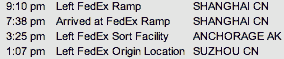
This past week I had a new laptop shipped to me and, like anyone awaiting an expensive new toy, I tracked the package every step of the way. The morning after the laptop left China, I checked the tracking log which looked much like the above image. Unless my laptop somehow made its way from Suzhou, across the Pacific to Anchorage and then back across to Shanghai in just over six hours, the tracking is incorrect.
It’s easy to see where the shipping company went wrong with their package tracking web application. They fell victim to one of the classic blunders of date manipulation: forgetting to include the timezone. If FedEx, the company which “Runs on Time” can make this mistake, then so can you.
If your application deals with dates and times, you should remember the following, among other things:
- If your application stores dates, either include the matching timezone or store all dates based on some fixed timezone, such as GMT or UTC. This way you can easily see how much time has passed between dates, regardless of timezone.
- If your application stores dates and/or times, be sure to include the full date even if you think you will not need it. It is a lot easier to include support for dates and/or times in your code later on than populating them in existing data. This should go without saying, but include every portion of the date that you can. A few years back I was integrating with a client which did not include the year in their stored dates, and it made their application confusing not to mention hampered our integration.
- If your application displays dates, make sure that it does so in a consistent and possibly configurable manner. Confusing your users with several different formats, none of which they can control, does not lead to proper usability. Doing so will also hamper any integration efforts which may occur in the future. I once integrated with an application which used no less than six different date formats in its output. Needless to say, the integration did not go well.
Posted on May 16th, 2005 in computers, programming - 1 Comment »